Wednesday, July 31, 2013


Security of a website can't reach 100%, hackers always find new vulnerabilities and they exploit it to attack systems and applications. But you can improve your website security and decrease the chances of getting hacked by following these advices.

For the webserver:

1- choose a web server in mac, mac have more security than Linux, Linux have more security than Windows.

2-if you have a personal server in your computer like big companies have more security than a host servers,

3-a website hosted in a virtual machine (VPS) have more security than a website hosted in a simple machine.

4-the operating system and the applications where the webserver is running, should always get last security updates.

5-the webserver should have antivirus and Anti-DDOS attack protection.

6-the webserver should have a firewall against malicious requests.

For the web application (script):

1- if u use a downloaded script, use the one that have good support and updates, and don't use a lot of (Add-ons, plugins, modules ,gadgets), less add-ons means less vulnerabilities.

2- if the web script is developed by you from zero, you need to know that bad programming means more vulnerabilities

3- your web script should be programmed to crypt passwords(md5,sha-1,DES...), and u have to use a hard password for your admin account.

4-the password of your admin account should be different than the (cpannel, ftp, phpmyadmin, mysql...) passwords.

5- change the path and the name of the website administration's folder, and if u have Cpannel you can give a password for this folder.
ex: www.yoursite.com/admin/index.php
www.yoursite.com/folder/folder/../adminwebfolder/index.php

this needs also to modify some codes in your script

6-use a website vulnerability scanner, like Acunetix wvs or nikto... to know if your website is vulnerable to attacks like (sql injection, local file include, remote file include, authentication bypass, buffer overflow, XSS, CSRF...).

Posted on 7:06 PM by test

No comments


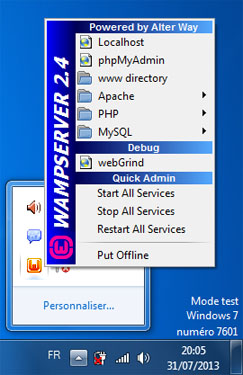
wampserver is marked online, but his icon in notification area is orange, that's means there is a problem to connect to the appache server service, so u need to check httpd.conf file's settings in apache menu, but most of time if u didn't touch this file the problem is due to port conflict.


just close the application that uses the same port as apache(port 80),or change connection settings of this application, we are not talking here about browsers.


for example if you are running skype and you got this problem just follow this steps.

methode(A):1- close skype.

methode(B):

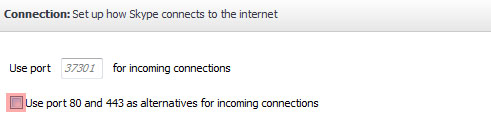
1- in the menu bar of skype click tools then options
2- in the skype options left side click advanced then connection.
3- uncheck "use port 80 and 443 as alternatives for incoming connections.

Posted on 1:08 PM by test

No comments


trend micro the Japanese security software entreprise, has found malicious firefox and chrome plugins that take control of user accounts on social networks.

trend micro explained that those plugins share contents and like pages and posts in facebook, twitter, google+ Without the user's approval.

the names of those malwares in google chrome are(Chrome Service Pack 5.0.0,F-Secure Security pack 6.1.0), and in mozilla firefox (Mozilla Service Pack 5.0,F-Secure Security pack 6.1). the malicious istalled files have these names TROJ_FEBUSER.AA and JS_FEBUSER.AA.

tren micro confirmed that the hackers have added a trusted electronic signature to the browser extensions in order to facililate its mission in control uses accounts on the three social networks easily without being discovered by antivirus softwares.

this malware attacks only chrome and firefox users.

Trend micro advised the users to make sure of any browser extension source before downloading it to not give opportunity for malicious files to infect their computers.

Posted on 11:19 AM by test

No comments

Monday, July 29, 2013


this is important for cybercafe goers to prevent cybercafe's owner from spying on them.

1-start
2-control pannel
3-firewall
4-allow programms throught windows firewall
5-choose handycafe client

6-delete
7-confirm (OK)

Posted on 4:24 PM by test

No comments


Get exactly what you're searching for easily with one of these google commands.
-Searching for a precise Sentence,in google's search textbox type your sentence between quotes:
"your sentence"

-seaching for a specific file type(extensions:pdf,rar,zip,mp3,flv.....),in google's search textbox type the name of the file you are search for then filetype:extension
query file_type:pdf

-searching for a sentence that exist in a specific domaine name(domaine_name:com,info,org,biz,us,co,uk,fr,nl....),in google's search textbox type your query then
site:domain_name
query site:uk


-searching for a sentence that exist in titlebar of the browser:
allintext: query

-searching for a sentence that exist in a website content:
allintext: query

-searching for a sentence that existe in website Link/URL:
allinurl: query

Posted on 2:32 PM by test

No comments


this problem is due the bad connectivity between the A/C adapter pin and the device power receptacle.

most of the time, the colored plastic circle is broken, just buy a new pin to repair your adapter.

Posted on 11:31 AM by test

No comments


Connectify Hotspot helps you share your computer's Internet connection with many other systems over Wireless wi-fi . On condition that your pc is on-line , the other nearby devices - and friends and partners - will be , too

Connectify transform your computer or laptop to a wireless router.

Share computer internet connection

1- install and run hotspot Connectify: http://www.connectify.me/hotspot/

2- Hotspot name (SSID): Enter the name you want to show in wifi networks.

3- choose a password for your new SSID.

4- Start Hotspot.

Posted on 10:23 AM by test

No comments