Showing posts with label network. Show all posts

Wednesday, July 31, 2013


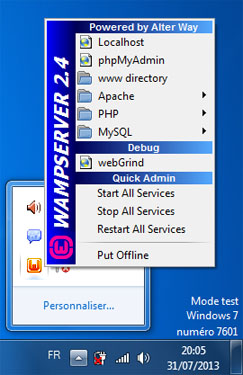
wampserver is marked online, but his icon in notification area is orange, that's means there is a problem to connect to the appache server service, so u need to check httpd.conf file's settings in apache menu, but most of time if u didn't touch this file the problem is due to port conflict.


just close the application that uses the same port as apache(port 80),or change connection settings of this application, we are not talking here about browsers.


for example if you are running skype and you got this problem just follow this steps.

methode(A):1- close skype.

methode(B):
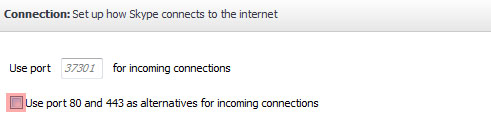
1- in the menu bar of skype click tools then options
2- in the skype options left side click advanced then connection.
3- uncheck "use port 80 and 443 as alternatives for incoming connections.

Posted on 1:08 PM by test

No comments

Monday, July 29, 2013


Connectify Hotspot helps you share your computer's Internet connection with many other systems over Wireless wi-fi . On condition that your pc is on-line , the other nearby devices - and friends and partners - will be , too

Connectify transform your computer or laptop to a wireless router.

Share computer internet connection

1- install and run hotspot Connectify: http://www.connectify.me/hotspot/

2- Hotspot name (SSID): Enter the name you want to show in wifi networks.

3- choose a password for your new SSID.

4- Start Hotspot.

Posted on 10:23 AM by test

No comments

Sunday, July 28, 2013


open port in d-link DSL-2640R
1-enter this adresse in the browser: 192.168.1.1
2-enter username and password: by default the username is admin and the password is admin
3-click Advanced
4-choose Port forwarding
5-click Add button
6-private ip: enter your computer ip in local network
  protocol Type:ALL TCP/UDP
  Public start port: the port you want to open
  Public End port: put the same value u put in public start port or heigher value if u want to open a ports range.
  Connection:PVC0 or PVC1...
7-Apply

Posted on 8:47 PM by test

No comments